Wireless G Network Speed Optimization Tips
Are you tired of slow and unreliable Wireless G network speeds? Optimizing your Wireless G network can make a huge difference in your online experience. In this article, we will explore various tips and techniques to improve your Wireless G network speed, range, and reliability.
Understand Wireless G Network Optimization
Wireless G network optimization involves tuning and configuring a wireless system to achieve the best possible performance. This process includes improving signal strength, increasing throughput, reducing latency, minimizing interference, ensuring security, and enhancing user experience. By applying the following Wireless G network speed optimization tips, you can ensure a smooth and seamless online experience.
Wireless G Network Speed Optimization Tips
- Position Your Router Properly: The location of your router plays a significant role in determining the strength and reliability of your Wireless G network. Place your router in a central location, away from obstructions and interference-causing devices.
- Update Your Router Firmware: Regularly update your router firmware to ensure you have the latest features and security patches. This will help improve your network's performance and security.
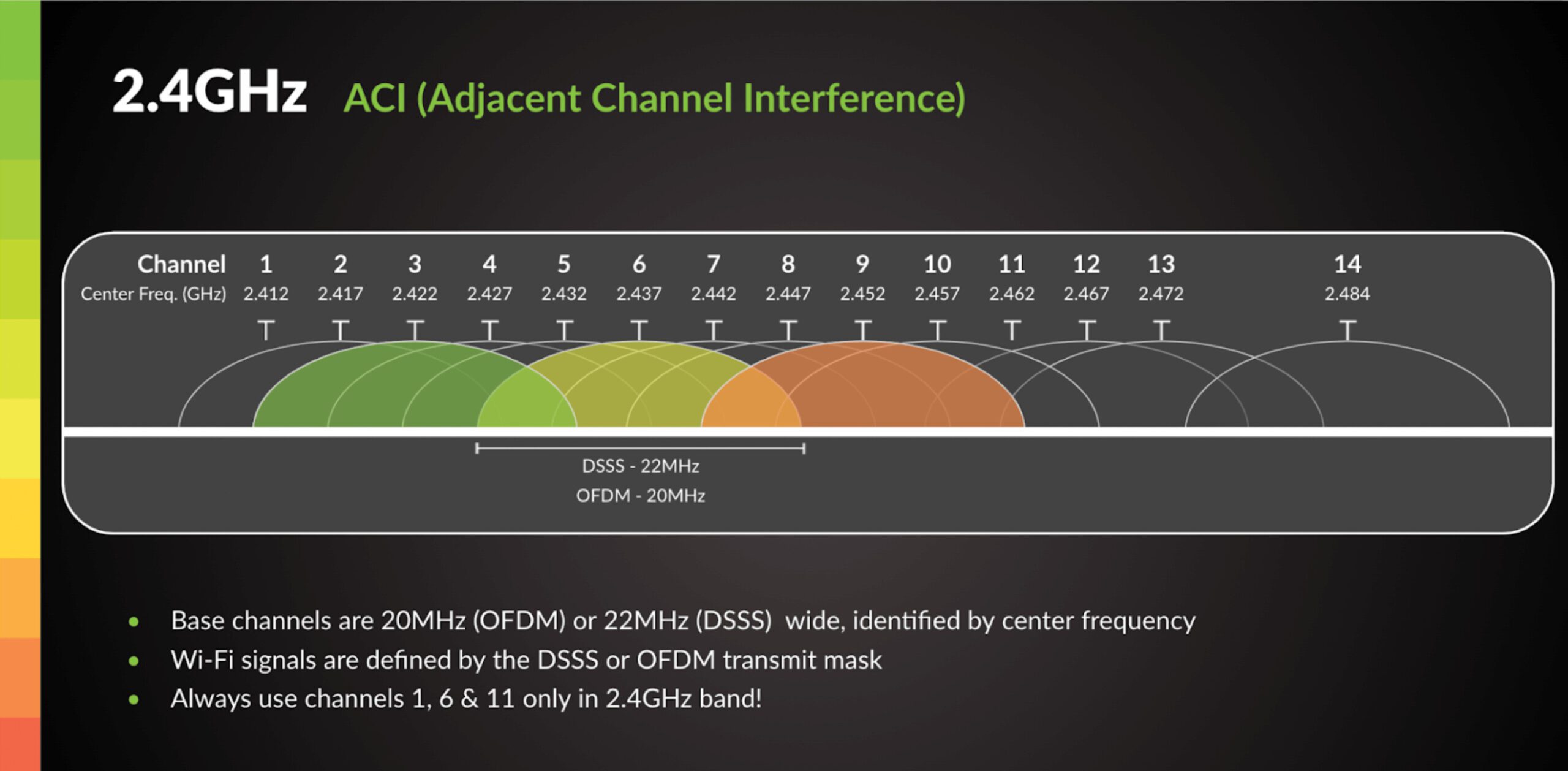
- Change Your Wi-Fi Channel: Wireless G networks use a specific channel to transmit data. Changing your Wi-Fi channel can help minimize interference from neighboring networks and improve your network's performance.
- Use Quality of Service (QoS) Settings: QoS settings allow you to prioritize traffic on your network, ensuring critical applications receive sufficient bandwidth. This is particularly useful for online gaming and video streaming.
- Upgrade to a Better Antenna: A high-quality antenna can significantly improve your Wireless G network's range and reliability. Consider upgrading to a directional or high-gain antenna for better performance.
- Reduce Interference from Other Devices: Other wireless devices, such as cordless phones and microwaves, can interfere with your Wireless G network. Move these devices away from your router or use a wireless network analyzer to identify and mitigate interference.
- Use a Wireless Network Analyzer: A wireless network analyzer can help you identify areas of your network that require optimization. This tool can also help you detect and eliminate sources of interference.
- Secure Your Network: Secure your Wireless G network by changing the default administrator password, enabling WPA2 encryption, and setting up a guest network for visitors.
- Regularly Back Up Your Router Settings: Regularly backing up your router settings can help you restore your network to its optimal configuration in case of a reset or firmware update.
- Use a Range Extender or Repeater: If you have a large home or office, consider using a range extender or repeater to amplify your Wireless G network's signal and extend its range.

Conclusion
By applying these Wireless G network speed optimization tips, you can improve your network's performance, range, and reliability. Remember to regularly update your router firmware, change your Wi-Fi channel, and use quality of service settings to ensure a smooth and seamless online experience. With these tips, you can enjoy faster and more reliable Wireless G network speeds.
Additional Resources
For more information on Wireless G network optimization, check out the following resources:
- NetSpot - A wireless network planning and analysis tool
- Cisco Wireless Home Network Design Guide - A comprehensive guide to designing and optimizing wireless home networks
- Wi-Fi Planet - How to Optimize Your Wi-Fi Router for Better Speed and Range - A tutorial on optimizing your Wi-Fi router for better performance